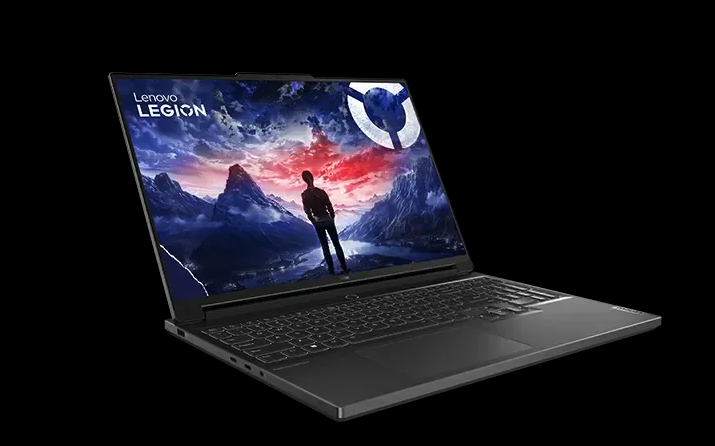
Editing / VR PC (Lenovo Legion 7)
High-performance laptop (Lenovo Legion 7, i9 + RTX 4070) for video editing, 360-degree footage processing and VR applications.
Overview
The editing / VR PC is a high-performance laptop (Lenovo Legion 7) for compute-intensive media work. We recommend it for:
- a) Video editing – smooth editing and exporting, even of 4K footage.
- b) Processing 360-degree footage – reframing/stitching, e.g. from the Insta360 X4, needs a lot of compute and graphics power.
- c) VR applications – e.g. VR games such as Star Trek: Bridge Crew for team-building activities.
Thanks to the NVIDIA RTX 4070, Intel Core i9 and 32 GB of RAM, the device handles these tasks reliably. On request we can add a computer mouse.
Technical data
| Feature | Value |
|---|---|
| Model | Lenovo Legion 7 16IRX9 (Type 83FD) |
| Processor | Intel Core i9-14900HX (14th generation) |
| Graphics | NVIDIA GeForce RTX 4070, 8 GB graphics memory |
| Memory | 32 GB DDR5-5600 (2× 16 GB) |
| Storage | 1 TB SSD (PCIe) |
| Display | 16-inch, 3.2K |
| Operating system | Windows 11 Pro (German) |
| Wi-Fi/Bluetooth | Wi-Fi 6E (2×2 AX), Bluetooth 5.1+ |
| Camera | 1080p FHD with dual microphone and e-shutter |
| Ports | USB 4.0, 2× USB-C 3.2 Gen 1, 2× USB-A 3.2 Gen 1, HDMI 2.1, SD card, combo audio, DC-IN |
| Weight | approx. 2.24 kg |
| Accessories | power adapter; computer mouse on request |
Use cases
Video editing
Suitable for common editing software; the RTX 4070 accelerates preview, effects and export. Work on footage and projects on the internal SSD and back up the finished video externally afterwards.
360-degree processing
For reframing and exporting 360-degree footage (e.g. Insta360 Studio). The high graphics and CPU power noticeably speeds up the compute-intensive stitching/export.
VR / team-building
For VR applications (e.g. Star Trek: Bridge Crew) as a team-building format. Plan for a VR headset and matching software separately, and run the laptop on the power adapter for this.
Usage notes
- Run on the power adapter: For full performance (editing, 360°, VR) keep the laptop plugged in – on battery the performance is throttled.
- Your own data: Back up projects/exports externally before returning and delete them from the device.
- Completeness: Return the power adapter (and mouse, if used) so the set stays complete.
Note: Windows 11 Pro is installed. Do not permanently install additional software or change system settings; the device is used by others afterwards.