DJI Mic
Wireless clip-on microphone system with two transmitters and one receiver – for clean audio in interviews, talking-head videos and two-person recordings.
Overview
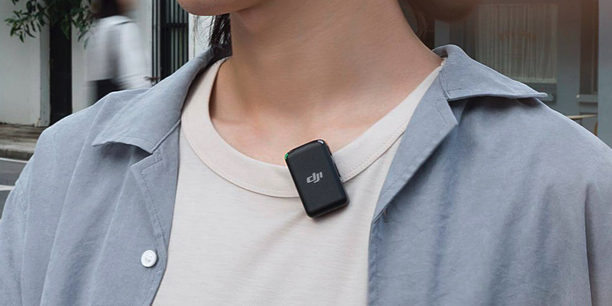
The DJI Mic is a wireless clip-on microphone system for noticeably better audio than the camera’s built-in mic. It consists of two transmitters (with a built-in microphone) and one receiver – so you can record two people at the same time, e.g. for interviews, conversations or talking-head videos.
The transmitters attach to clothing via clip or magnet and send the audio wirelessly to the receiver, which sits on the camera or smartphone. Each transmitter also records internally – even if the wireless link briefly drops, the audio is preserved as a backup.
We have the DJI Mic 6 times in stock – several sets can be combined for larger setups.
Technical data
| Feature | Value |
|---|---|
| In the box | 2 transmitters (TX) + 1 receiver (RX) + charging case |
| Channels | 2 (two people simultaneously) |
| Mounting | clip + magnet per transmitter |
| Internal recording | 8 GB per transmitter (≈ 14 h as audio backup) |
| Range | up to 250 m (line of sight) |
| Receiver display | touchscreen |
| Battery life | approx. 5.5 h per TX/RX · charging case ≈ 15 h extra |
| Camera output | 3.5 mm jack (TRS) |
| Smartphone connection | USB-C and Lightning adapters (included) |
| Windscreen | clip-on furry windscreen per transmitter |
Quick start
- Connect the receiver: Mount the receiver (RX) on the camera’s hot shoe and connect it to the mic input with the 3.5 mm cable – or plug it straight into a smartphone via the USB-C / Lightning adapter.
- Attach the transmitter: Fix a transmitter (TX) to the speaker’s clothing using the clip or magnet, as close to the mouth as possible (chest height).
- Power on: Receiver and transmitters pair automatically (pre-paired in the set). The active channels appear on the receiver display.
- Check levels: While speaking, the level bars should move clearly but not stay maxed out – adjust the gain on the receiver if needed.
Note: For outdoor recordings, fit the furry windscreen onto the transmitter – this greatly reduces wind noise.
Power & charging
Transmitters and receiver are charged and stored in the charging case. Charge everything fully before a shoot; on location the case acts as an extra power bank. After use, put all parts back into the case so the set is complete and charged for the next loan.
After use
Back up and delete your own internal recordings on the transmitters, return all parts (2 transmitters, receiver, adapters, windscreens, cable) to the charging case and close it.